Lighter for Philips Hue Lights
- 3.8
- Rating
- 100.00K
- Installs
- Free
- Price
 Analysis by App-foxy
I tried Lighter for Philips Hue Lights as a companion for a Philips Hue setup, and my first impression was that it aims to make everyday lighting feel less technical. Rather than treating smart bulbs as a collection of settings to manage, it presents itself as a lighter way to work with them. That makes the app interesting for people who already own Hue lights but find the standard control experience more involved than they need.
This is a free House & Home app from A Better Home, LLC, rated for Everyone. It has passed the early-adopter stage, with over 100,000 installs, a 3.8 average from around 700 ratings, and dozens of written reviews. Those figures suggest a useful but not universally loved tool: enough people have made it part of their lighting routine, while the middling score is a reminder that compatibility, expectations, and personal taste matter here.
What the app is really useful for
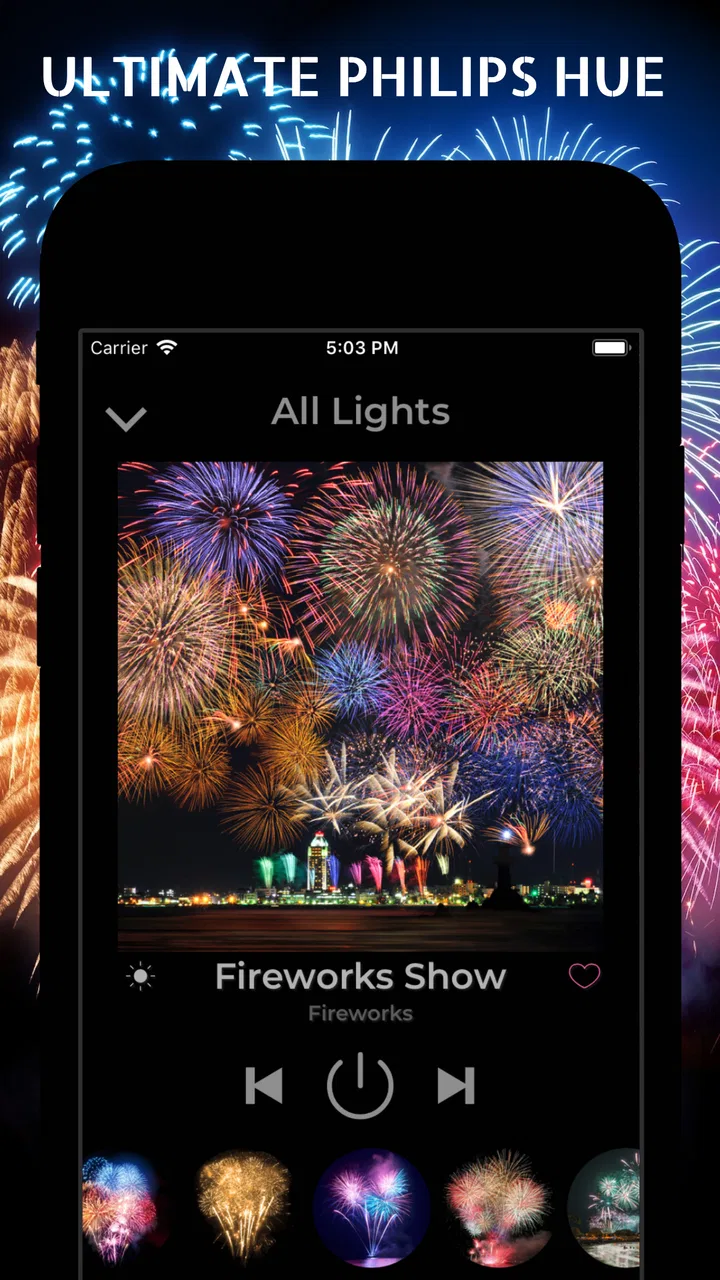
The central appeal is straightforward: Philips Hue lights are capable of doing much more than simply turning on and off, but many people do not want to spend time designing lighting scenes from scratch. The app’s focus on lighter control and a “Scene of the Week” concept points toward quick experimentation. I see it as a shortcut for someone who wants a room to feel different without learning every corner of the Hue ecosystem.
You May Also Like

 Blood Strike: 2.5 Anniversary
Blood Strike’s Loadouts Turn Every Drop Into a Tactical Gamble
A close look at Blood Strike’s custom loadouts: how fast access to signature weapons reshapes its battle royale rhythm, rewards preparation, and narrows the gap between fights.

 Pandora - Music & Podcasts
Pandora’s Music Is Easy to Start, but Harder to Recover
Pandora’s strength is its low-effort path from a seed to a station. Its weak spot is how much confidence it asks you to place in connection, setup, and quiet recovery.

 8 Ball Pool
 Is Built on Rivalries, Rematches, and Routine
A close look at the rivalries, rematches, shared routines, and unanswered safety questions that turn a quick pool match into a persistent mobile community.

 Samsung Music
’s Quiet Strength Is Playing What You Already Own
Its reach comes less from spectacle than from dependable access to a personal library. That simplicity is both the app’s strongest retention engine and its ceiling.

 AccuWeather: Weather Radar
AccuWeather Review: A Quick, Clear Forecast for Everyday Decisions
For everyday plans, the best forecast is the one you can understand quickly. AccuWeather makes rain timing, radar, and local conditions easy to act on, with a few trade-offs.

 Hill Climb Racing
Why Hill Climb Racing Still Turns Crashes Into One More Run
A tiny car, a bumpy hill and one more upgrade: Hill Climb Racing keeps resurfacing because its simple chaos makes every near-miss feel personal.
More From Our News Desk



That distinction matters. This is not the kind of app I would choose merely to replace a wall switch. Its potential value appears when lighting becomes part of a routine: a softer room in the evening, a more energetic color atmosphere while cleaning, or a themed look when friends come over. The benefit is not that a bulb suddenly becomes brighter or smarter. The benefit is reducing the effort between opening the app and getting a mood you actually want.
In daily use, the most sensible approach is to treat it as a creative layer over existing Philips Hue hardware. I would keep the regular Hue controls available for precise tasks, then use this app when I want a faster visual change. That division of labor prevents disappointment. A lightweight scene-oriented tool can be enjoyable, but it should not be expected to replace every detailed control offered by a full smart-lighting system.
Cost is simple, but the purchase decision is not
The app itself is free to download, which makes testing it relatively easy for existing Hue owners. There is no need to commit money before discovering whether its style fits the way you use your lights. That is important in this category because an app can look appealing in a description yet feel unnecessary once you already have a reliable lighting routine.
Optional in-app purchases range from $0.99 to $29.99 per item. I would therefore separate the decision into two stages: first decide whether the free experience improves your lighting, then decide whether any paid addition is worth it. The presence of purchases does not automatically make the app poor value, but it does mean that “free” should be understood as free entry rather than a promise that every part of the experience costs nothing.
For me, the right test is practical. Use the free version during several different moments instead of judging it after one glance: a quiet evening, a busy household morning, and a social occasion. If it becomes the quickest route to the lighting you want, a purchase may have a reasonable purpose. If you still reach for the normal Hue app or a physical control every time, spending more would only add another layer to your setup.
The current version is 1.0.142.30, and the app requires Android 7.0 or later. Those details are especially relevant for people using an older Android phone as a dedicated smart-home controller. Before planning around it, I would check that the device you intend to keep in the kitchen, hallway, or living room meets that requirement. The app is also available in the broader Android app context, while iPhone users should verify the appropriate platform listing before assuming the same experience is available there.
Where the value shows up in a real routine
Imagine coming home after work with the main room still set to the bright lighting used during the day. I would rather open a scene-focused controller and move directly to a calmer atmosphere than adjust several bulbs one by one. The useful part is the reduced decision-making: instead of asking which color, brightness, or combination will feel right, I can start with a prepared idea and refine it only if necessary.
Another practical case is hosting a casual dinner. A normal lighting app can certainly change the room, but the process may involve remembering which bulbs belong together and adjusting them individually. A scene-based approach is more convenient when I am also cooking, answering the door, or trying to keep conversation moving. The app earns its place when it saves attention, not merely when it offers another way to tap a color wheel.
A less obvious use is discovery. People often buy color-capable Hue bulbs and then settle into one warm-white setting because experimenting feels like work. A rotating or highlighted scene idea can break that habit. Even if I do not keep the suggested look, it can show me combinations I would not have tried. That makes the app more like a source of prompts than a permanent replacement for every other control method.
There is also a useful separation between “lighting for the room” and “lighting for the moment.” A carefully saved household routine may be dependable, but it can become invisible after a while. A fresh scene can make the same furniture feel different without buying anything new. That is a modest benefit, but it is exactly the sort of benefit that can justify a specialized Hue companion.
Three details that affect the experience more than the description suggests
First, the number of Hue bulbs in a room changes the value considerably. With one lamp, a scene may feel like a quick color change. With several lights, coordinated control becomes more meaningful because the atmosphere depends on how the bulbs work together. I would not judge the app only from a single-bulb setup; its convenience is more apparent when manual adjustment would otherwise become repetitive.
Second, scenes are not automatically the best answer for every room. In a bedroom, a gentle and consistent setting may matter more than variety. In a workspace, too much color experimentation can become distracting. I would use the app selectively: creative scenes in social or relaxation areas, and predictable settings where comfort, reading, or concentration comes first.
Third, a scene can be visually attractive while still being inconvenient in practice. A dramatic color mix may look good for a short visit but become tiring during a long evening. My tip is to judge a scene after living with it for a while, not just after seeing the initial transition. The strongest option is often the one that feels natural after the novelty fades.
Tradeoffs compared with the usual alternatives
The official Philips Hue app is the obvious alternative, especially for users who want the broadest control over their lighting system. It is the safer choice when I need detailed configuration, dependable management of established routines, or a single place for all Hue-related tasks. A lighter companion makes more sense when creative selection and quick atmosphere changes matter more than exhaustive control.
Voice assistants and operating-system shortcuts offer a different advantage: speed without opening a screen. Saying a command or tapping a home-screen control can be faster for a familiar action such as turning lights off. This app has a stronger case for people who want to browse visual ideas rather than issue the same command repeatedly. If your lighting needs are mostly binary, another controller may be more efficient.
Physical switches and dimmers remain hard to beat for shared spaces. Guests, children, and family members do not always want to learn a new app. I would keep a simple physical option available even if I enjoyed using this one, because smart lighting becomes frustrating when the phone is unavailable or someone else needs immediate control.
There is a tradeoff between simplicity and depth here. A focused interface can make the first useful result arrive faster, but it may feel limiting to an enthusiast who wants to fine-tune every aspect. Conversely, the official tool can feel more substantial than necessary when all I want is a pleasant scene before watching a film. Neither approach is universally better; they serve different moods and levels of involvement.
Who is likely to get genuine value?
I would recommend trying it to a Philips Hue owner who enjoys changing the feel of a room but rarely has the patience to build lighting combinations manually. It is also a reasonable fit for someone setting up a shared living area, where quick scene selection is more approachable than asking everyone to understand detailed smart-home controls.
It may appeal to renters and casual smart-home users as well. Because the value comes from using existing Hue lights differently, it can make a familiar setup feel more flexible without requiring a larger hardware project. The free entry point helps here: you can explore the workflow before deciding whether it deserves a permanent place among your home controls.
I would be more cautious if you own only ordinary white bulbs, use another lighting brand, or expect a universal smart-home dashboard. The app’s identity is tied to Philips Hue, so it is not a sensible choice simply because you want any kind of home-lighting controller. It is also not my first recommendation for someone who wants deep automation, extensive device management, or a control method that every person in the house can use without a phone.
Users with older Android devices should pay attention to the operating-system requirement, and anyone sensitive to optional purchases should decide in advance how much they are willing to spend. The free download removes much of the initial risk, but it does not remove the need to evaluate whether paid content adds something meaningful to your own routine.
My verdict after weighing the free and paid value
I see Lighter for Philips Hue Lights as a useful specialist rather than an essential smart-home app. Its strongest idea is making Hue scenes feel more approachable and less like a technical project. For the right household, that can turn underused color bulbs into something people actually enjoy. The free access makes it worth testing, especially if your current lighting routine has become repetitive.
My recommendation is to try it when you want inspiration, faster mood changes, or a friendlier way to explore the Hue lights you already own. Keep the standard Hue controls or a physical switch for precision and reliability. I would skip it if your needs stop at on, off, and dimming, or if you are looking for a brand-neutral controller.
The 3.8 average reflects my overall view: there is a worthwhile idea here, but its usefulness depends heavily on your hardware, habits, and tolerance for maintaining more than one lighting app. A free trial makes that uncertainty manageable. I would not pay for optional items simply because they are available; I would pay only after the app has proven that its scenes save time or make the room more enjoyable. For existing Hue owners who want a little more atmosphere with less effort, that is a fair reason to give it a place on the phone.
FAQs for Lighter for Philips Hue Lights
01What is Lighter for Philips Hue Lights and what does it do?
Lighter for Philips Hue Lights is a companion app designed to give you a more convenient way to control compatible Philips Hue bulbs and lighting scenes. After connecting it to your Hue Bridge or supported lights, you can usually adjust brightness, switch colors, turn lights on or off, and organize lamps by room. Its usefulness depends on your existing Hue setup and the permissions or connection method required by the app.
02Does Lighter for Philips Hue Lights require a Philips Hue Bridge?
Whether a Philips Hue Bridge is required depends on the lights and connection method supported by your specific version of the app. Many Hue control apps communicate through the Hue Bridge, while some may support selected Bluetooth-enabled bulbs directly. Before downloading, check the app’s current compatibility information, because features such as room control, routines, accessories, and advanced scenes may only work when a Hue Bridge is connected to the same network.
03Which Philips Hue lights and devices are compatible with the app?
Compatibility can vary between Philips Hue bulbs, lamps, light strips, switches, sensors, and Bridge generations. The app may work best with standard Hue lights that are already configured in the official Hue system, but not every third-party Zigbee product or older accessory is guaranteed to function correctly. Confirm the supported devices in the app listing and test your lights through the official Hue app before troubleshooting Lighter.
04Is Lighter for Philips Hue Lights free to use, or does it include in-app purchases?
The download and basic controls may be available at no cost, but some versions of Lighter for Philips Hue Lights can include advertising, premium tools, subscriptions, or one-time purchases. Paid features may cover advanced scenes, automation, widgets, multiple rooms, or an ad-free experience. Review the store page carefully before installing, especially the subscription terms, trial period, renewal conditions, and refund policy associated with your device platform.
05Is Lighter for Philips Hue Lights safe and easy to set up?
Setup is generally straightforward if your Hue lights are already connected and your phone is using the same Wi-Fi network as the Hue Bridge. You may need to approve local-network, Bluetooth, or notification permissions depending on the available features. As with any third-party smart-home controller, review its privacy policy and requested permissions, keep the app updated, and avoid sharing account credentials unless the app clearly explains why they are necessary.
Pros
- Quickly dims or brightens Hue lights from a simple interface.
- Useful for creating a softer atmosphere without opening the official Hue app.
- Works well for quick lighting adjustments during daily routines.
- Can be convenient for users with several Hue bulbs or rooms.
- Lightweight design makes it easy to keep available for frequent use.
Cons
- Requires Philips Hue hardware and a compatible bridge or setup.
- Limited usefulness if your home has lights from other smart-home brands.
- May need network permissions to discover and control Hue devices.
- Advanced scenes and automation tools may be unavailable or limited.
- Performance can depend on your Wi-Fi connection and Hue bridge response.

Lighter for Philips Hue Lights
Gallery